![Loopfront-1.svg]](https://knowledgebase.loopfront.com/hubfs/Loopfront-1.svg)
Products & objects
- Inventory object list exports
Now you will find an "export"-button in the top of the objects view in inventory. This allows you to filter the inventory (by i.e locations, statuses, categories ) and create an export based on you current view and filters.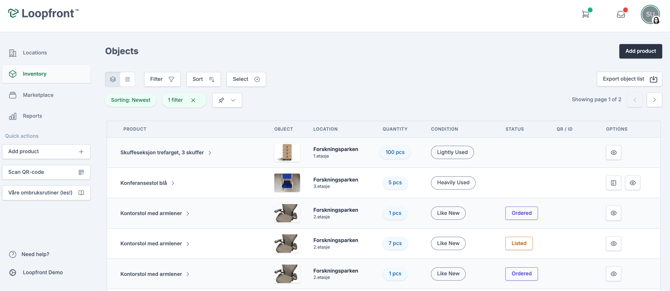
The excel export includes an overview of objects with all information and images, including QR-codes, planning statuses and planning-information.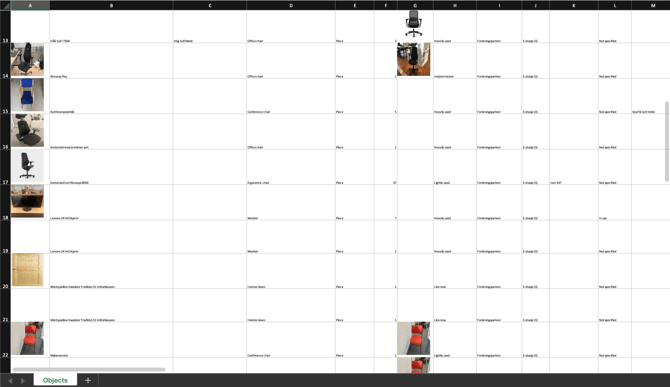
Note: to reduce the generating time and file size of the export, objects with the same product image are grouped, displaying the product image on the top of the group in the list.
Marketplace & orders
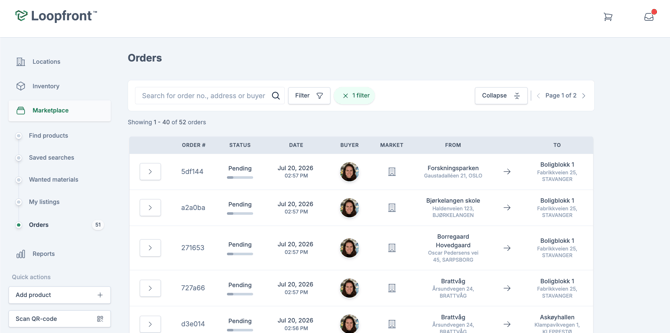
- Improved searching on order page: On top of the order page in Loopfront, you will now find a new search bar that allows you to search by order number, adresses or names of users, making it easier to find specific orders.
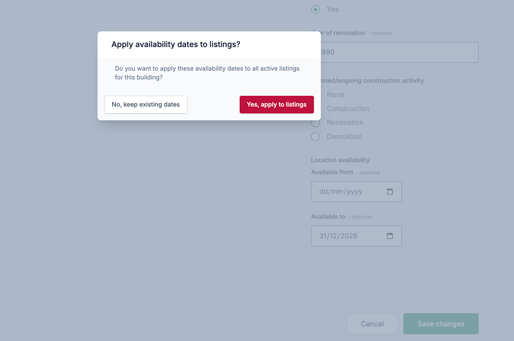
- Location and listing availability dates: On the locations page you can now update the availability date for a location (availability before i.e demolition, refurbishing or relocation) so that all marketplace listings connected to this location will be auto-filled with the locations availability date. In this way you won't have to manually add the same availability date for all listings, and if you change the availability date for a location you can chose to either update or keep existing availability dates for all connected listings.
QR
-
New improved design and features for the Loopfront QR-tool: By scanning QR-codes attached to objects in Loopfront, you can now carry out more actions directly through the QR-scanner. The new QR-tool includes:
- Quick action-button depending on the objects current status (more coming soon)
Not specified - move object
In use - marked as not in use
Listed - view listing
Ordered - view order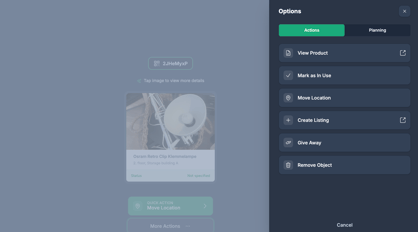
- Quick action-button depending on the objects current status (more coming soon)
-
- Carry out actions:
View Product
Mark as Not In Use
Mark as In Use
Move Location
Give Away
Remove Object
- Carry out actions:
-
- Shortcut to edit object details (placement, condition, images and more)
- Update planning statuses (coming soon)
The new QR-tool is currently under development, but will eventually be replacing the current QR-tool for all users. If you want to test out the feature now, you can contact us at support@loopfront.com